Vehicle Fleet Master
Manage fleet inventory, vehicle categories, status lifecycle, and vehicle detail records
Overview
The Vehicle Fleet Master is the central record for every vehicle in your rental fleet. It tracks vehicle specifications, current status, rental history, damage records, maintenance logs, and financial performance. Every reservation, contract, inspection, and billing transaction links back to a vehicle record.
Vehicle List
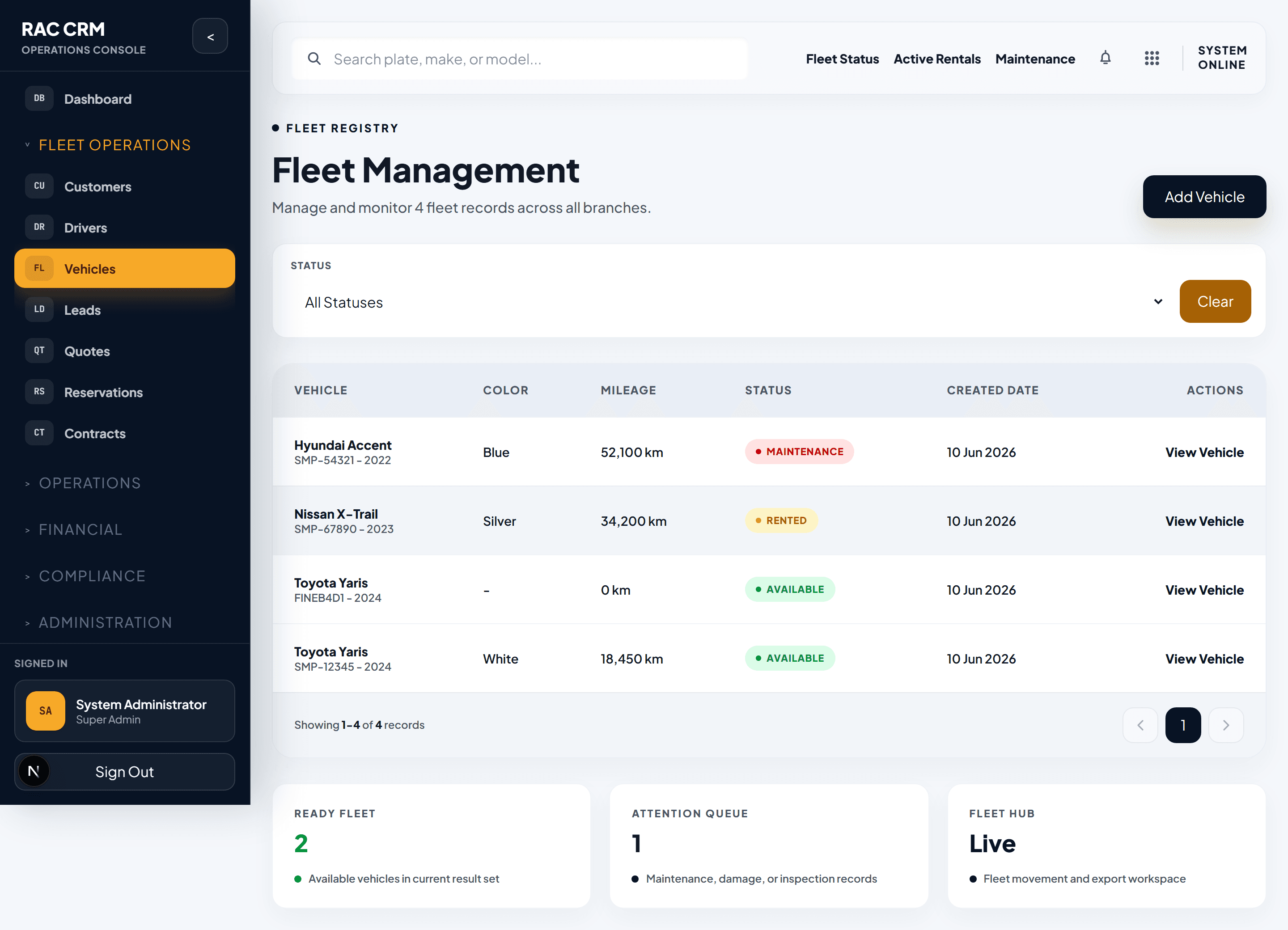
The vehicle list provides a complete view of the fleet. Use filters to narrow by status, category, branch, make, model, or availability.
List Columns
| Column | Description |
|---|---|
| Plate Number | Vehicle registration plate (primary identifier) |
| Make / Model | Manufacturer and model name |
| Year | Manufacturing year |
| Category | Fleet category (Economy, Sedan, SUV, Luxury, etc.) |
| Status | Current operational status |
| Branch | Assigned operational branch |
| Mileage | Current odometer reading |
| Next Service | Upcoming scheduled maintenance date |
Quick Filters
| Filter | Purpose |
|---|---|
| Status | Available, Reserved, Rented, Maintenance, etc. |
| Category | Economy, Sedan, SUV, Luxury, Van, Truck |
| Branch | Vehicles at a specific location |
| Make / Model | Filter by manufacturer or model |
| Insurance Expiry | Vehicles with insurance expiring soon |
| Registration Expiry | Vehicles with registration expiring soon |
Vehicle Categories and Classes
Vehicles are organized into categories and classes to support pricing, reporting, and fleet management.
| Category | Example Classes |
|---|---|
| Economy | Compact, Hatchback |
| Sedan | Standard Sedan, Premium Sedan |
| SUV | Compact SUV, Full-Size SUV, Premium SUV |
| Luxury | Executive, Prestige |
| Van | Passenger Van, Cargo Van |
| Truck | Light Truck, Heavy Truck |
Each category maps to a pricing tier. The pricing engine resolves rates using a hierarchy: vehicle-specific override, then make/model/trim, then make/model, then class/segment, then category fallback.
Vehicle Status Lifecycle
Every vehicle moves through a controlled status lifecycle. Status changes are recorded in the status history and must follow valid transitions.
| Status | Meaning | Can Be Rented? |
|---|---|---|
| Available | Ready for rental at assigned branch | Yes |
| Reserved | Held for an upcoming reservation | No |
| Rented | Currently on an active rental contract | No |
| Maintenance | Undergoing scheduled or unscheduled repair | No |
| Damaged | Awaiting damage assessment or repair | No |
| Inspection Pending | Needs pre-rental or post-return inspection | No |
| Transfer Pending | Being moved between branches | No |
| Sold | Removed from active fleet | No |
| Inactive | Temporarily out of service | No |
Valid Status Transitions
| From Status | Allowed Next Statuses |
|---|---|
| Available | Reserved, Maintenance, Inspection Pending, Transfer Pending, Sold, Inactive |
| Reserved | Rented, Available (if reservation cancelled) |
| Rented | Return Pending, Extension Requested |
| Maintenance | Available, Inspection Pending |
| Damaged | Maintenance, Available (if cleared) |
| Inspection Pending | Available, Maintenance, Damaged |
| Transfer Pending | Available (at new branch) |
| Sold | (Terminal status) |
| Inactive | Available (if reactivated) |
Callout: Every status change is recorded with a timestamp, the user who made the change, and the reason. This audit trail is essential for fleet accountability and dispute resolution.
Adding a New Vehicle
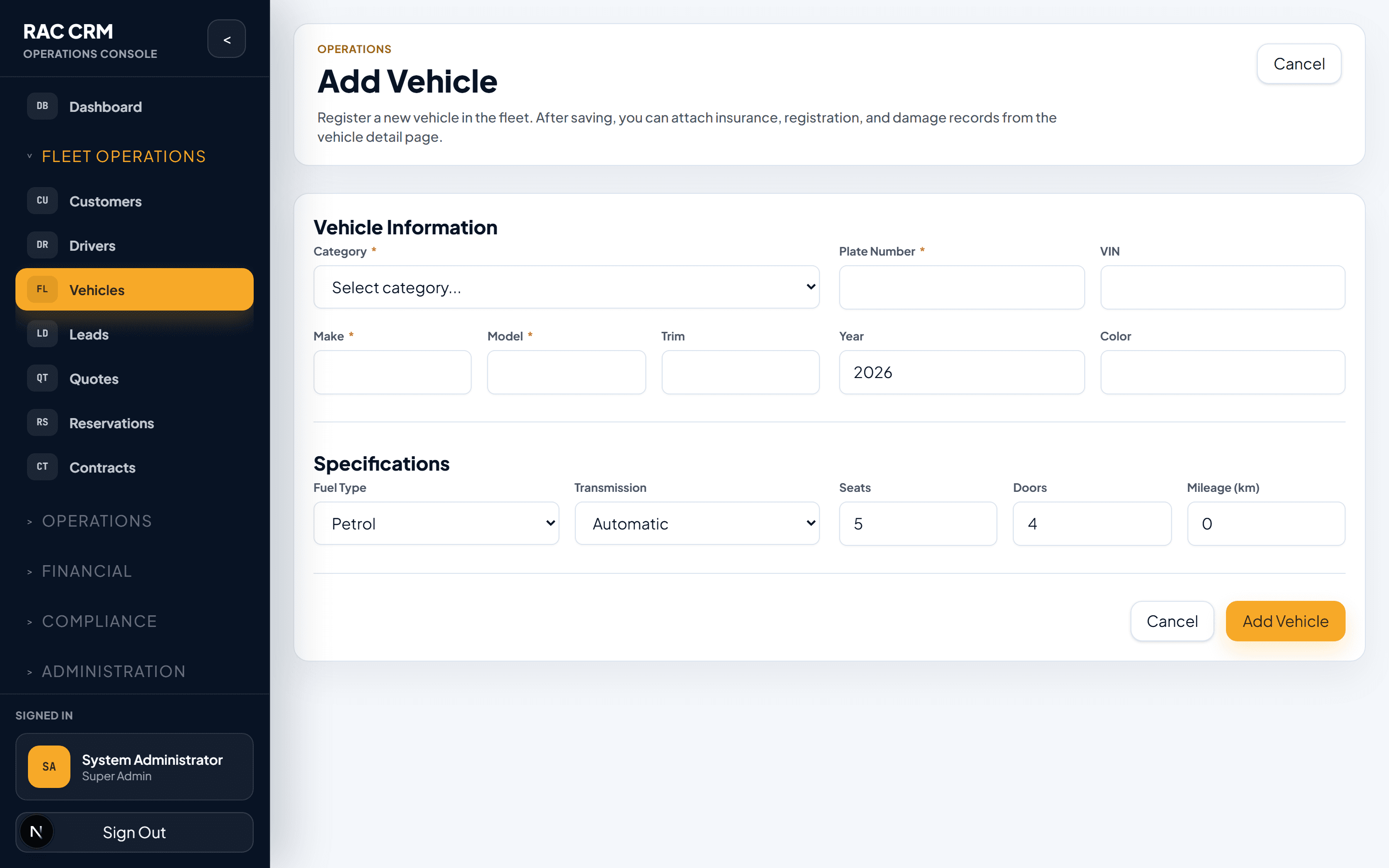
To register a new vehicle in the fleet:
- Click Add Vehicle from the vehicle list.
- Fill in required fields:
| Field | Required | Notes |
|---|---|---|
| Plate Number | Yes | Unique identifier, must not duplicate |
| Make | Yes | Manufacturer name (Toyota, BMW, etc.) |
| Model | Yes | Model name (Camry, X5, etc.) |
| Year | Yes | Manufacturing year |
| Color | Yes | Exterior color |
| Category | Yes | Economy, Sedan, SUV, Luxury, Van, Truck |
| Class | Yes | Segment within category |
| Fuel Type | Yes | Petrol, Diesel, Hybrid, Electric |
| Transmission | Yes | Automatic or Manual |
| Seating Capacity | Yes | Number of seats |
| Branch | Yes | Assigned operational branch |
| VIN | Yes | Vehicle Identification Number |
| Registration Number | Yes | Official registration ID |
| Registration Expiry | Yes | When registration expires |
| Insurance Provider | Yes | Insurance company name |
| Insurance Policy Number | Yes | Policy reference |
| Insurance Expiry | Yes | When insurance expires |
| Current Mileage | Yes | Odometer reading at acquisition |
| Daily Rate | No | Can be set in pricing module |
| Notes | No | Internal notes about the vehicle |
- Click Save.
- The vehicle is created with Available status.
- Upload registration and insurance documents in the Documents tab.
Business Tip: Vehicles cannot be assigned to new contracts if registration or insurance has expired. Set calendar reminders for renewal dates to avoid gaps in fleet availability.
Vehicle Detail View
The vehicle detail page provides a complete 360-degree view of the vehicle.
1. Specifications
Core vehicle information at a glance:
- Make, model, year, color
- Plate number and VIN
- Fuel type and transmission
- Seating capacity and category
- Current mileage
2. Status History
A chronological timeline of every status change the vehicle has undergone. Each entry shows:
- Previous status and new status
- Date and time of change
- User who made the change
- Reason or reference (contract number, maintenance request, etc.)
3. Rental History
All past and current rental contracts for this vehicle:
| Field | Description |
|---|---|
| Contract Number | Unique rental agreement reference |
| Customer | Renter's name |
| Period | Pickup date to return date |
| Duration | Number of rental days |
| Revenue | Total rental amount charged |
| Return Condition | Any damage or issues noted at return |
4. Damage Records
A log of all recorded damage events:
| Field | Description |
|---|---|
| Date | When the damage was recorded |
| Reported By | Staff member or customer |
| Location | Where the damage occurred |
| Description | Nature and extent of damage |
| Photos | Attached evidence images |
| Assessment | Estimated repair cost |
| Liability | Customer, insurance, or internal |
| Resolution | Repair status and cost |
5. Maintenance Log
All scheduled and unscheduled maintenance activities:
| Field | Description |
|---|---|
| Request Date | When the maintenance was requested |
| Type | Preventive, corrective, or emergency |
| Description | Work to be performed |
| Workshop | Internal or external service provider |
| Parts Used | Components replaced or repaired |
| Cost | Total maintenance cost |
| Downtime | Days the vehicle was out of service |
| Completion Date | When the vehicle was returned to service |
6. Financial Summary
Aggregated financial performance for the vehicle:
| Metric | Description |
|---|---|
| Total Revenue | Lifetime rental revenue generated |
| Total Maintenance Cost | All maintenance and repair costs |
| Total Insurance Cost | Insurance premiums paid |
| Downtime Cost | Estimated revenue lost during non-available periods |
| Net Profit | Revenue minus all direct costs |
| Revenue Per Day | Average revenue per available day |
Business Tip: Review the financial summary quarterly to identify vehicles that cost more to maintain than they generate in revenue. These may be candidates for disposal or replacement.