Driver Management
Add drivers, verify licenses, link to contracts, and track expiry dates
Overview
The Driver Management module tracks every person who operates a rental vehicle — whether they are the primary customer or an additional driver added to a contract. Driver records hold license information, verification status, and linkage to rental contracts. Accurate driver records are critical for insurance coverage, compliance, and accident liability.
Driver List
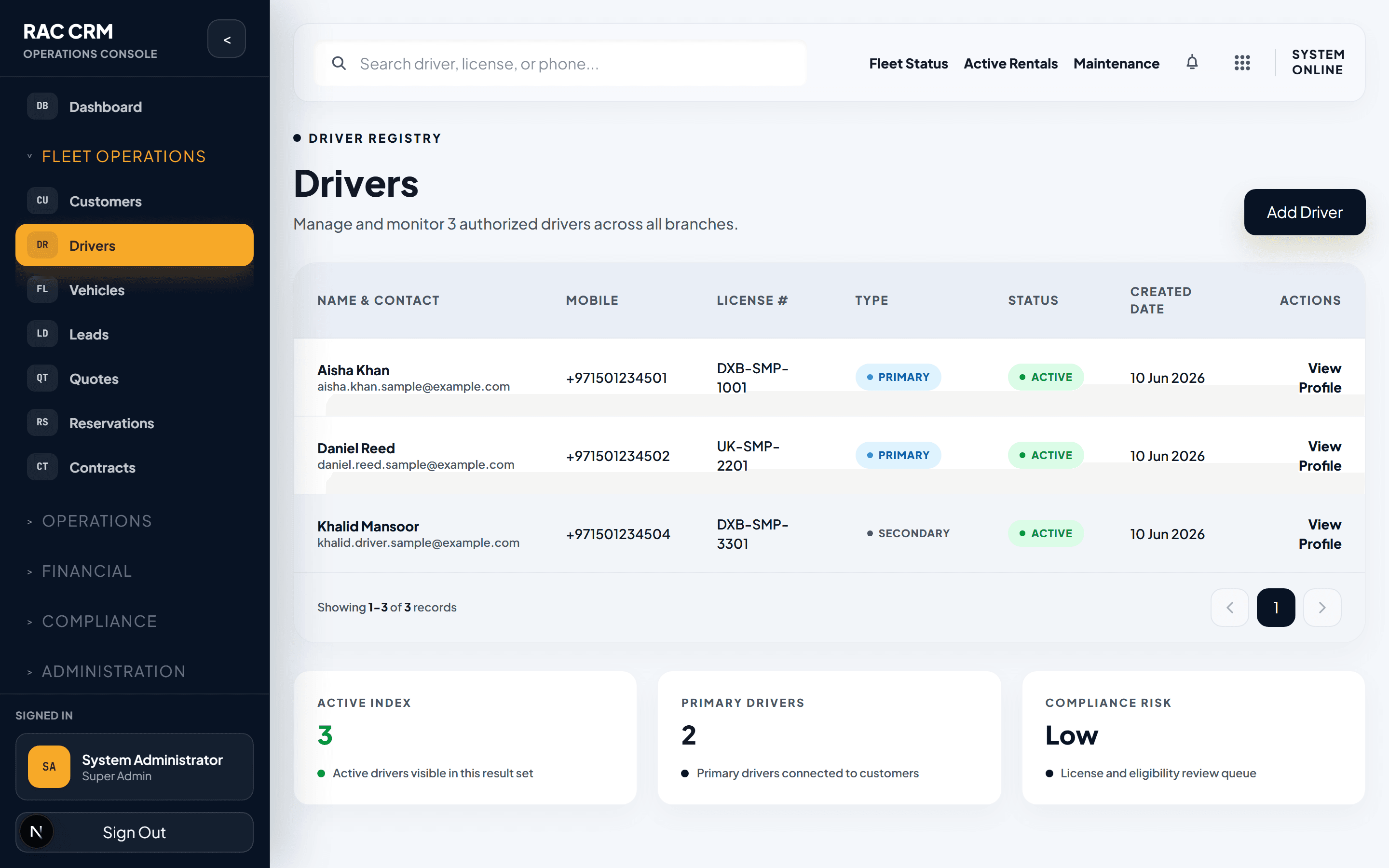
The driver list shows all registered drivers with their verification status, license details, and current contract linkage. Use the search bar to find drivers by name, license number, or linked customer.
List Columns
| Column | Description |
|---|---|
| Name | Driver full name |
| Customer | Linked customer profile (if additional driver) |
| License Number | Driving license number |
| License Expiry | Expiration date of the driving license |
| License Category | Vehicle types the license covers (e.g., Light Vehicle, Heavy Vehicle) |
| Verification Status | Pending, Verified, Expired, or Rejected |
| Active Contract | Current contract number if driving an active rental |
Quick Filters
| Filter | Purpose |
|---|---|
| Verification Status | Find drivers pending verification |
| License Expiry | Identify drivers with expiring licenses |
| Branch | Drivers associated with a specific branch |
| Active / No Active Contract | Separate currently renting drivers from inactive ones |
Adding a New Driver
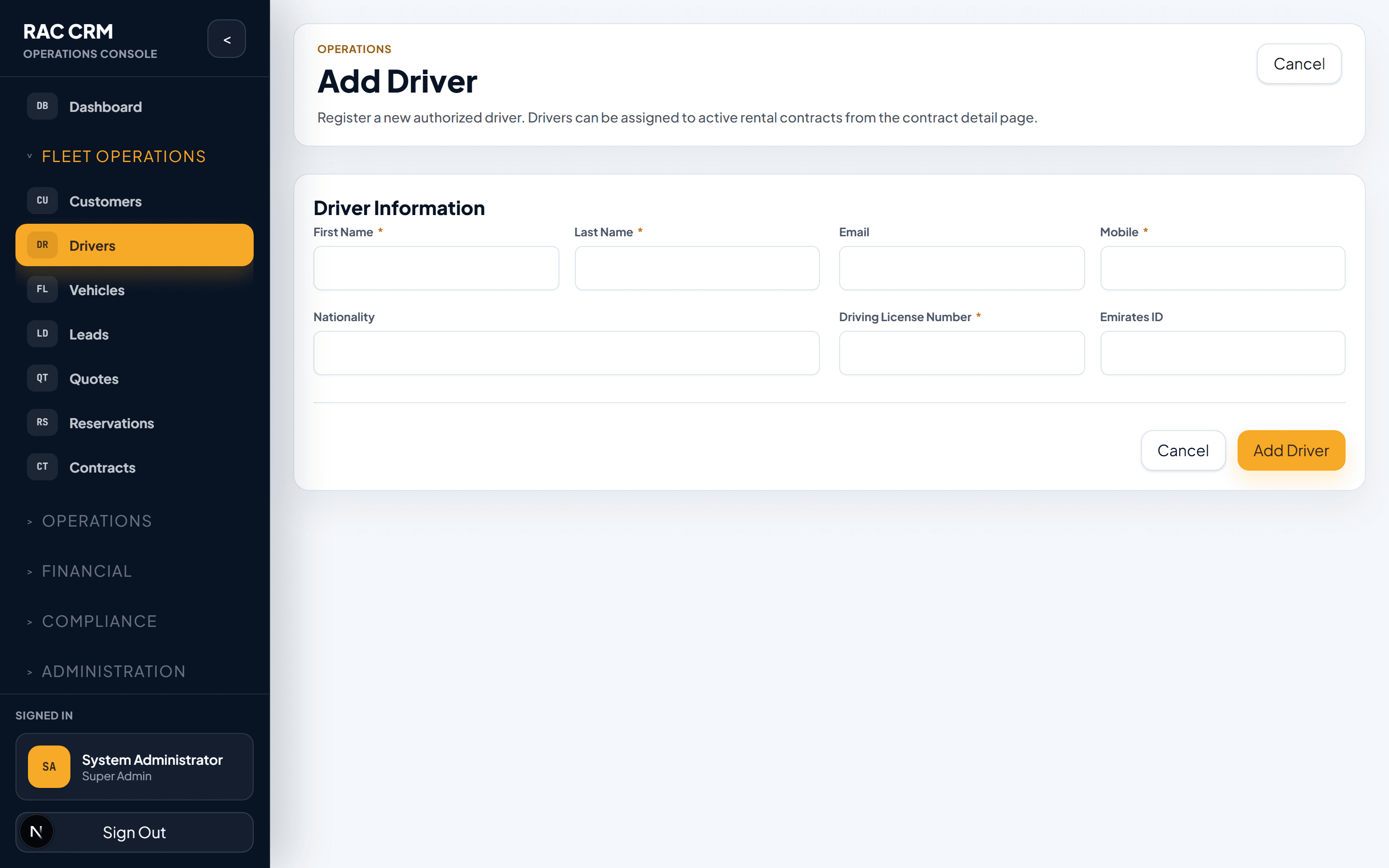
To register a new driver in the system:
- Navigate to Drivers > Add Driver.
- Select whether this driver is:
- Primary Driver — the customer renting the vehicle
- Additional Driver — a secondary driver added to an existing contract
- Fill in required fields:
| Field | Required | Notes |
|---|---|---|
| First Name | Yes | As shown on driving license |
| Last Name | Yes | As shown on driving license |
| Date of Birth | Yes | Minimum age 21 for standard vehicles |
| Mobile Number | Yes | Primary contact number |
| Email Address | No | For notifications |
| License Number | Yes | As printed on the driving license |
| License Issue Date | Yes | When the license was issued |
| License Expiry Date | Yes | When the license expires |
| License Category | Yes | Light Vehicle, Heavy Vehicle, Motorcycle, etc. |
| Nationality | Yes | Country of citizenship |
| ID Type | Yes | Emirates ID, Passport, or National ID |
| ID Number | Yes | Must match the uploaded document |
- Click Save.
- Upload the driving license document in the Documents tab.
Business Tip: Drivers under 21 years of age may require additional insurance or manager approval depending on your branch policy. Check your branch configuration before proceeding.
License Verification
Every driver must have their license verified before being assigned to a contract. The verification process ensures the license is genuine, current, and covers the vehicle category being rented.
Verification Steps
- Open the driver detail page.
- Click the Documents tab.
- Upload the driving license (front and back).
- Review the uploaded images against the driver's profile details.
- Click Verify License.
- Select a verification outcome:
| Outcome | Meaning |
|---|---|
| Verified | License is valid and matches profile |
| Expired | License has passed its expiry date |
| Rejected | License does not match or is invalid |
| Pending Review | Requires manager or compliance review |
- Add a verification note if needed.
- Click Confirm.
Callout: A driver with an expired or rejected license cannot be assigned to a new rental contract. Existing active contracts must be reviewed immediately if a driver's license expires during the rental period.
Linking Drivers to Contracts
Drivers are linked to rental contracts at two points:
At Checkout
- During the contract checkout wizard, the primary driver is selected from the customer profile.
- Additional drivers can be added in the Drivers step of the checkout wizard.
- Each additional driver must be verified before the contract can become active.
Adding a Driver During an Active Contract
- Open the active contract detail page.
- Click Actions > Add Additional Driver.
- Search for the driver by name or license number.
- If the driver is not in the system, create a new driver record first.
- Verify the driver's license if not already verified.
- Confirm the addition. The driver is linked to the contract and appears on the rental agreement.
Contract Driver Information
| Field | Captured At |
|---|---|
| Driver name and license number | Checkout |
| License verification status | Checkout |
| Additional driver fee | Checkout (if applicable) |
| Driver assignment start date | Checkout or addition date |
| Driver assignment end date | Check-in |
Expiry Tracking
The system monitors license expiry dates and generates alerts to prevent non-compliance.
Expiry Alert Rules
| Alert | Timing | Action Required |
|---|---|---|
| License expiring in 30 days | Warning | Notify driver to renew |
| License expiring in 7 days | Urgent | Contact driver, plan contract adjustment |
| License expired | Blocked | Driver cannot be assigned to new contracts |
| License expired during active contract | Critical | Review contract, may require early return or driver swap |
Handling an Expiring License
- The system sends an expiry warning notification to the branch and the driver.
- If the driver renews their license, upload the new document and update the expiry date.
- If the license expires before renewal, the driver is blocked from new assignments.
- For active contracts with an expired license, the branch manager must decide:
- Add a new verified driver to the contract
- Return the vehicle early
- Request a compliance override (requires justification and approval)
Business Tip: Set up a weekly review of the driver expiry report to proactively contact drivers before their licenses expire. This reduces last-minute contract disruptions.
Driver Detail View
The driver detail page consolidates all driver information:
Sections
| Section | Contents |
|---|---|
| Profile | Personal details, contact information, nationality |
| Documents | Uploaded license, ID, and verification status |
| Rental History | All contracts where this driver was assigned |
| Compliance | Risk flags, verification history, notes |
| Activity Log | Changes to driver record with timestamps and actor |
Callout: Always check the driver detail page before adding a driver to a high-value or long-term contract. A quick review of rental history and compliance flags helps prevent risk exposure.