Pricing Engine
Configure the 5-level pricing hierarchy, manage rate plans, simulate pricing, set branch-specific rates, and control discount approvals.
Pricing Engine
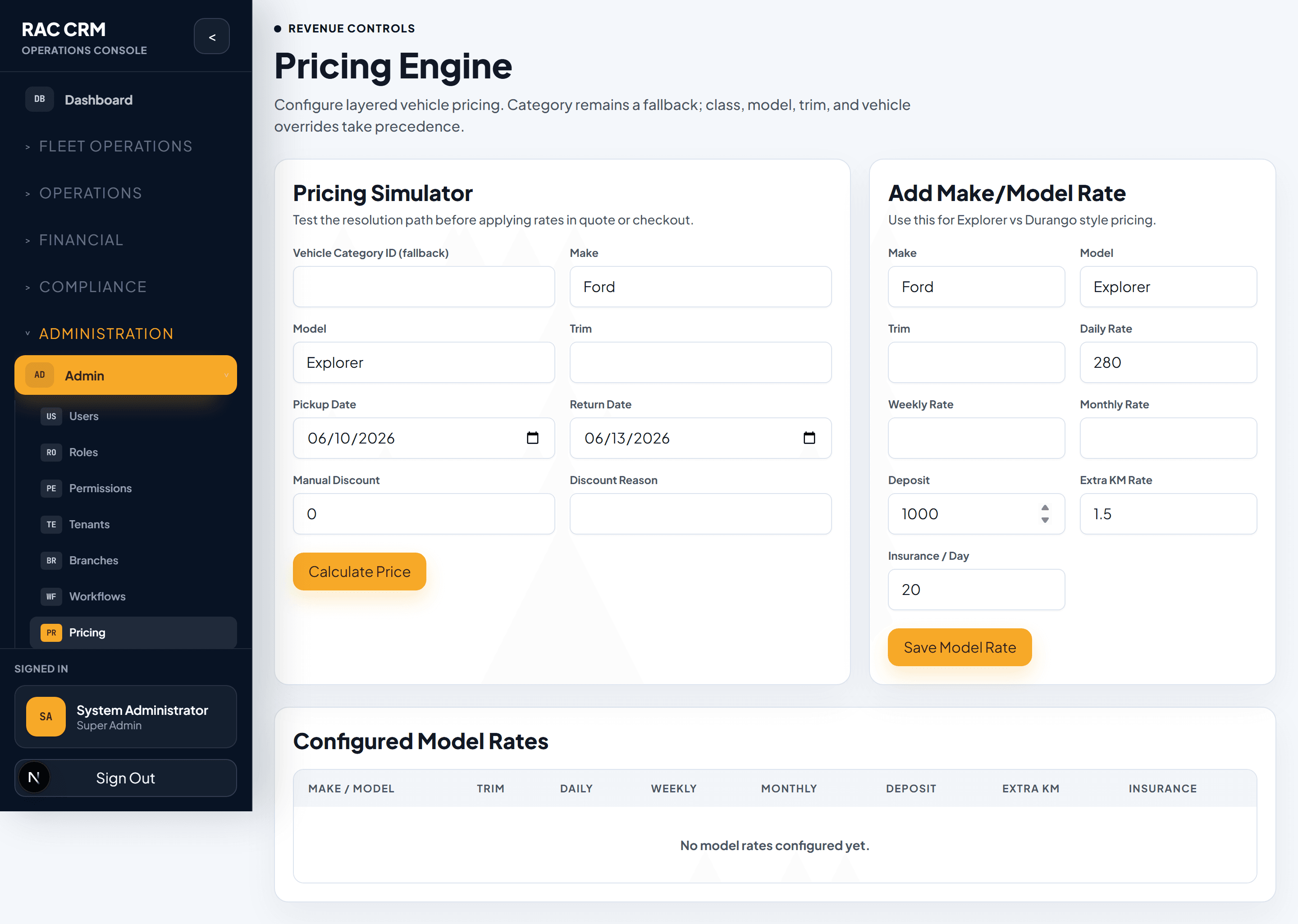
The Pricing Engine is one of the most powerful modules in the Rent a Car CRM. It calculates rental rates using a 5-level pricing hierarchy, supports branch-specific rates, integrates with discount approvals, and stores pricing snapshots for full auditability.
The 5-Level Pricing Hierarchy
The system calculates the best applicable rate by checking five levels of pricing specificity, from most specific to most general. The first match wins.
| Priority | Level | Scope | Example |
|---|---|---|---|
| 1 (Highest) | Vehicle-Specific Override | Individual vehicle | VIN #XYZ gets AED 120/day regardless of class |
| 2 | Make/Model/Trim Rate | Specific make + model + trim | Toyota Camry SE gets AED 140/day |
| 3 | Make/Model Rate | Make + model (any trim) | Any Toyota Camry gets AED 150/day |
| 4 | Vehicle Class/Segment Rate | Vehicle class (e.g., Sedan, SUV) | Any Sedan gets AED 130/day |
| 5 (Lowest) | Category Fallback | Vehicle category (e.g., Economy, Premium) | Any Economy car gets AED 100/day |
How the Hierarchy Works
System identifies the vehicle — When a reservation or contract is created, the system identifies the vehicle (or vehicle class).
Check Level 1 — Is there a vehicle-specific override for this exact vehicle? If yes, use it.
Check Level 2 — Is there a make/model/trim rate? If yes, use it.
Check Level 3 — Is there a make/model rate? If yes, use it.
Check Level 4 — Is there a vehicle class rate? If yes, use it.
Check Level 5 — Is there a category fallback rate? If yes, use it.
No match found — The system flags the rate as unpriced and alerts the user to set a rate manually or contact an administrator.
This hierarchy ensures that specific overrides always take precedence while providing a safety net of fallback rates. A single vehicle-specific override can handle a premium customer, while category rates handle the bulk of your fleet.
Rate Plans
Rate plans define the daily, weekly, and monthly rates for each pricing level.
Rate Plan Fields
| Field | Description | Example |
|---|---|---|
| Plan Name | Descriptive name | "Weekday Saver" |
| Rate Level | Which hierarchy level | Vehicle Class Rate |
| Daily Rate | Price per day | AED 130 |
| Weekly Rate | Price per 7-day period (may be discounted) | AED 800 (vs. 7 × AED 130 = AED 910) |
| Monthly Rate | Price per 30-day period | AED 2,800 |
| Minimum Rental | Minimum rental period | 1 day |
| Maximum Rental | Maximum rental period (if any) | 365 days |
| Mileage Included | Kilometers included per day | 250 km/day |
| Excess Mileage Rate | Charge per km over allowance | AED 0.50/km |
| Effective From | Start date for this rate | 2026-01-01 |
| Effective To | End date (null = indefinite) | 2026-12-31 |
| Branch | Branch-specific (null = global) | DXB-Marina |
Rate Plan Types
| Type | Description | Use Case |
|---|---|---|
| Standard | Regular published rate | Most reservations |
| Corporate | Negotiated rate for corporate accounts | Corporate contracts |
| Promotional | Time-limited special rate | Seasonal campaigns |
| Long-Term | Discounted rate for extended rentals | 30+ day rentals |
| Insurance Replacement | Rate for insurance replacement rentals | Insurance company partnerships |
Branch-Specific Rates
Different branches can have different rates based on local market conditions, competition, and demand.
Branch Rate Configuration
| Setting | Description |
|---|---|
| Branch Override | Set a completely different rate for a specific branch |
| Branch Multiplier | Apply a percentage multiplier to the global rate (e.g., 110% for airport branches) |
| Branch Minimum | Set a floor price that cannot be overridden by discounts |
Example: Airport vs. City Rates
| Vehicle Class | City Rate | Airport Rate (115%) | Downtown Rate (95%) |
|---|---|---|---|
| Economy | AED 100/day | AED 115/day | AED 95/day |
| Sedan | AED 130/day | AED 150/day | AED 124/day |
| SUV | AED 200/day | AED 230/day | AED 190/day |
| Luxury | AED 350/day | AED 400/day | AED 333/day |
Pricing Simulator
The pricing simulator allows staff to quickly check the calculated rate for a vehicle, date range, and customer type — without creating a reservation.
How to Use the Simulator
Navigate to Pricing → Simulator — The simulator form opens.
Select or enter vehicle — Choose a specific vehicle, or select make/model/class.
Enter rental dates — Pickup and return dates.
Select rate type — Standard, corporate, promotional.
Select branch — The branch where the rental originates.
Click "Calculate" — The system shows the applicable rate from each hierarchy level, the winning rate, and the total estimated cost.
Simulator Output
| Field | Description |
|---|---|
| Hierarchy Match | Which level provided the rate (Level 1–5) |
| Daily Rate | Applicable daily rate |
| Rental Days | Number of days |
| Subtotal | Daily rate × days |
| Mileage Included | Total km included |
| Estimated Excess | If expected mileage exceeds allowance |
| VAT | Tax amount |
| Total Estimated | Grand total |
Discount Configuration & Approval
Discounts reduce the calculated rate. They require approval when they exceed configured thresholds.
Discount Types
| Type | Description | Example |
|---|---|---|
| Percentage | Discount as a percentage of the rate | 15% off |
| Fixed Amount | Discount as a flat amount | AED 50 off |
| Free Days | Certain rental days at no charge | 1 free day on 7-day rental |
| Upgrade | Free vehicle class upgrade | Sedan → SUV at Sedan rate |
Discount Approval Thresholds
| Discount Level | Threshold | Approver Required |
|---|---|---|
| Self-service | 0% – 10% | None (agent can apply) |
| Team Lead approval | 10.1% – 15% | Team Lead |
| Branch Manager approval | 15.1% – 25% | Branch Manager |
| Regional Manager approval | 25.1% – 35% | Regional Manager |
| Director approval | > 35% | Operations Director |
All discounts, regardless of size, are recorded in the audit trail. The system stores the calculated rate before and after the discount for full transparency.
Pricing Snapshots
Every time a rate is calculated for a contract or quote, the system stores a pricing snapshot — a complete record of the calculation inputs and outputs.
Snapshot Contents
| Field | Description |
|---|---|
| Vehicle ID | The vehicle used |
| Vehicle Class | Class at time of calculation |
| Make/Model/Trim | Vehicle details |
| Branch | Branch of rental |
| Rate Level Used | Which hierarchy level provided the rate |
| Daily/Weekly/Monthly Rate | Base rates |
| Rental Days | Duration |
| Mileage Allowance | Included kilometers |
| Applied Discounts | Any discounts with approval reference |
| Final Rate | Rate after all adjustments |
| Total Amount | Total rental amount |
| Calculation Timestamp | Exact time of calculation |
| Calculated By | User who triggered the calculation |
Pricing snapshots are immutable — they cannot be changed after creation. This provides a complete audit trail for any billing dispute or financial audit. View snapshots from the contract or quote detail page under the "Pricing" tab.
Common Tasks
| Task | Where | Permission Required |
|---|---|---|
| View rate plans | Pricing → Rate Plans | pricing:read |
| Create rate plan | Pricing → Rate Plans → New | pricing:configure |
| Edit rate plan | Pricing → Rate Plans → Edit | pricing:configure |
| Set vehicle-specific override | Pricing → Overrides → New | pricing:configure |
| Configure branch multiplier | Pricing → Branch Rates | pricing:configure |
| Run pricing simulator | Pricing → Simulator | pricing:read |
| Apply discount | Reservation or Contract form | pricing:apply_discount |
| Approve discount | Discount approval queue | pricing:approve_discount |
| View pricing snapshots | Contract detail → Pricing tab | pricing:read |
Related Pages
- Tenants & Branches — Branch structure for pricing
- Invoicing & Billing — How calculated rates appear on invoices
- Workflow Configuration — Discount approval workflows
Tenants & Branches
Manage tenants, business units, and branches, understand tenant isolation, and assign multi-level user access across your organization.
Workflow Configuration
Configure workflow definitions, versions, stages, transitions, assignment rules, approval rules, SLA rules, and notification rules.