Compliance Tasks
Managing compliance tasks for document expiry, vehicle documentation, RTA sync, and audit exceptions through assignment and escalation.
Overview
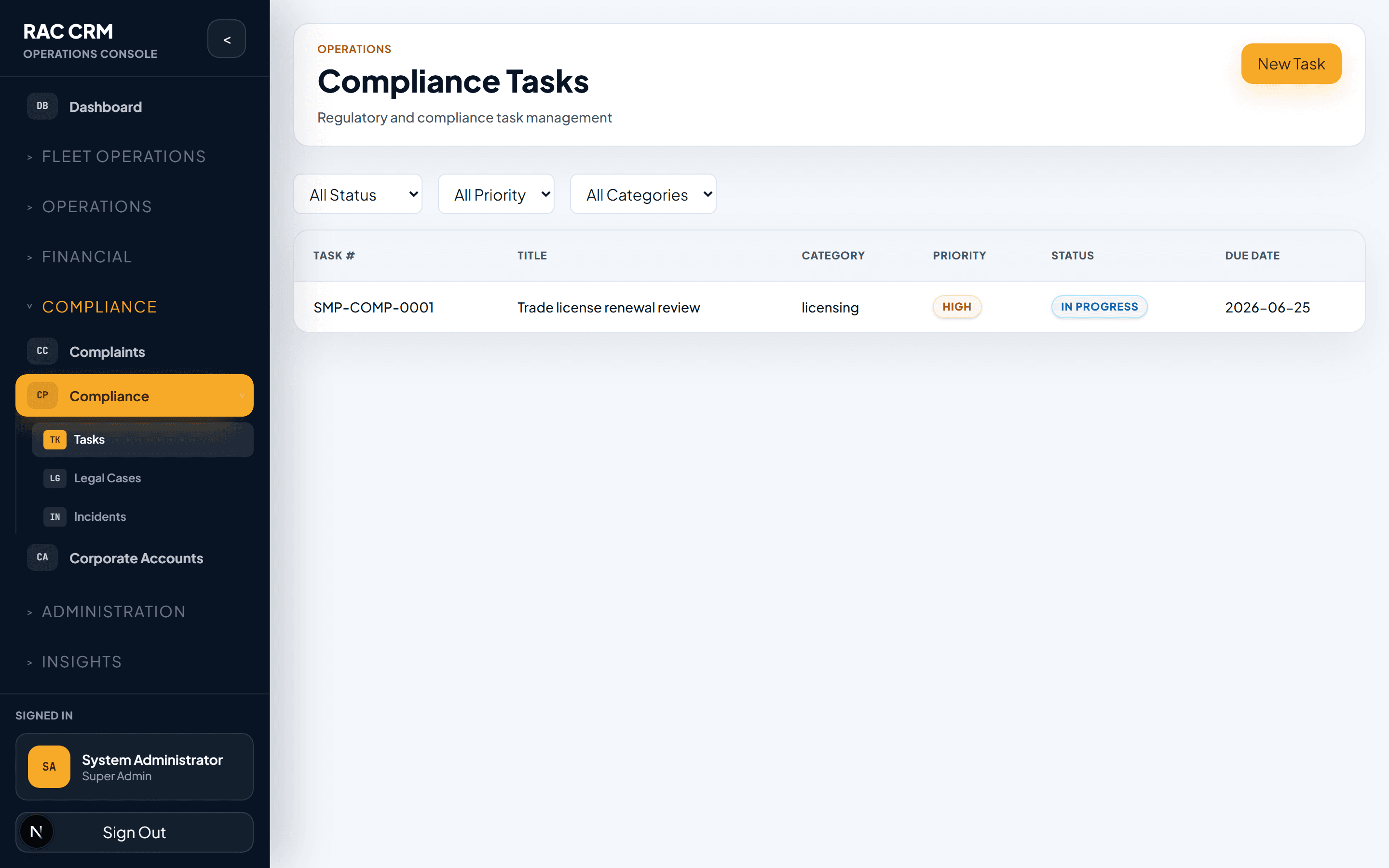
Compliance tasks ensure the business stays legally and operationally compliant. These are background tasks that must be completed on time to avoid fines, license revocations, or vehicle impoundment. The Compliance Tasks module provides a centralized inbox for tracking, assigning, and completing these obligations.
Task Types
| Task Type | Description | Typical Frequency | Consequence of Missing |
|---|---|---|---|
document_expiry | Customer or driver ID/license approaching expiry | Per document expiry date | Cannot create new reservations |
vehicle_registration_expiry | Vehicle registration renewal due | Annual | Vehicle cannot be legally driven |
vehicle_insurance_expiry | Vehicle insurance policy renewal due | Annual | Vehicle must be taken off-road |
vehicle_inspection_due | Periodic vehicle inspection (e.g., annual RTA test) | Annual | Vehicle cannot be rented |
rta_sync_failure | Automated RTA data sync encountered an error | As triggered | Data mismatch, potential fines |
audit_exception | System audit flagged an anomaly | As triggered | Depends on exception severity |
license_renewal | Driver license renewal reminder | Per license expiry | Driver cannot be assigned |
permit_expiry | Commercial or operational permit due | Per permit cycle | Business cannot operate legally |
insurance_claim_pending | Insurance claim requiring follow-up | Per claim | Financial loss, customer dispute |
corporate_agreement_expiry | Corporate account agreement expiring | Per agreement term | Revenue risk |
Task Inbox
The compliance task inbox provides a unified view of all pending and upcoming tasks.
Inbox Columns
| Column | What It Shows |
|---|---|
| Task ID | Unique identifier |
| Task Type | Category of compliance task |
| Entity | Related entity (vehicle, customer, driver, agreement) |
| Entity Detail | Plate number, customer name, license number, etc. |
| Due Date | When the task must be completed |
| SLA Status | On track, warning, breached |
| Assigned To | Staff member responsible |
| Priority | Critical, High, Medium, Low |
| Status | Pending, In Progress, Completed, Escalated |
| Actions | View, Assign, Complete, Escalate |
Filtering the Inbox
| Filter | Options |
|---|---|
| Task type | All, document expiry, vehicle docs, RTA sync, etc. |
| Status | Pending, In Progress, Completed, Escalated |
| Priority | Critical, High, Medium, Low |
| Due date | Overdue, due today, due this week, due this month |
| Assigned to | All staff, unassigned, specific staff member |
| Entity type | Vehicle, Customer, Driver, Corporate |
Task Lifecycle
| Status | Meaning | Who Sets It |
|---|---|---|
pending | Task created, awaiting assignment or action | System (auto-generated) |
in_progress | Staff member actively working on it | Assigned staff |
awaiting_external | Waiting for external entity (RTA, insurance company, customer) | Assigned staff |
completed | Task fulfilled and verified | Assigned staff |
escalated | Task breached SLA or requires management attention | System (auto) or staff |
cancelled | Task no longer needed (entity removed, duplicate, etc.) | Manager only |
Step-by-Step: Processing a Compliance Task
Step 1 — Review the Task
Open the task from the inbox. Review:
- What the task requires.
- Which entity is affected.
- When it is due.
- What documents or actions are needed.
Step 2 — Assign (if unassigned)
If the task is unassigned:
- Click Assign.
- Select a staff member from the dropdown.
- The staff member receives a notification.
Step 3 — Start Work
Click Start Task. Status changes to in_progress.
Step 4 — Complete the Task
Depending on the task type:
| Task Type | Completion Action |
|---|---|
| Document expiry | Verify renewed document uploaded, update expiry date |
| Vehicle registration | Confirm renewed registration uploaded, update system |
| Vehicle insurance | Confirm renewed policy uploaded, update system |
| Vehicle inspection | Confirm inspection certificate uploaded, update system |
| RTA sync failure | Resolve sync error, trigger re-sync, confirm data matches |
| Audit exception | Investigate, correct data or confirm as false positive |
| License renewal | Verify renewed license uploaded, update system |
| Permit expiry | Confirm renewed permit uploaded, update system |
Step 5 — Upload Supporting Document
For most compliance tasks, you must upload a supporting document:
- Click Upload Document.
- Select the file (PDF, JPG, or PNG).
- Enter the document reference number.
- Enter the new expiry date.
- Click Submit.
Step 6 — Mark Complete
Click Mark Complete. The system:
- Updates the related entity record (e.g., vehicle insurance expiry date).
- Closes the task.
- Creates an audit log entry.
- Schedules the next recurring task (if applicable).
Escalation Rules
| Condition | Escalation Target | Timeframe |
|---|---|---|
| Task due in 3 days, unassigned | Compliance Manager | Immediate |
| Task due today, not started | Branch Manager | Immediate |
| Task SLA breached | Operations Director | Within 2 hours |
| Task involves safety or legal risk | Compliance Officer + Legal | Immediate |
| RTA sync failure (critical) | IT Operations + Compliance | Within 1 hour |
Auto-Generated Tasks
The system automatically generates compliance tasks based on entity data:
| Trigger | Task Created | Advance Notice |
|---|---|---|
| Document expiry date within 30 days | document_expiry | 30 days before |
| Vehicle registration expiry within 60 days | vehicle_registration_expiry | 60 days before |
| Vehicle insurance expiry within 60 days | vehicle_insurance_expiry | 60 days before |
| Vehicle inspection due within 30 days | vehicle_inspection_due | 30 days before |
| RTA sync error detected | rta_sync_failure | Immediate |
| Audit anomaly detected | audit_exception | Immediate |
| Corporate agreement expiry within 30 days | corporate_agreement_expiry | 30 days before |
Priority Rules
| Priority | Criteria |
|---|---|
critical | Vehicle legally cannot operate; safety risk |
high | Vehicle cannot be rented; compliance risk |
medium | Task approaching deadline; no immediate operational impact |
low | Far-future task; administrative or informational |
Compliance Dashboard
The compliance dashboard at Compliance → Dashboard provides a high-level view:
| Metric | What It Shows |
|---|---|
| Open tasks by type | Bar chart of pending tasks by category |
| Overdue tasks | Count and list of tasks past due date |
| Upcoming deadlines | Tasks due in the next 7 days |
| SLA compliance rate | Percentage of tasks completed within SLA |
| Task completion trend | Monthly completion volume |
Callouts
Vehicle compliance tasks directly affect vehicle availability. A vehicle with an expired registration, insurance, or inspection must not be rented. The system blocks reservation assignment for non-compliant vehicles.
RTA sync runs nightly. If the sync fails for a vehicle, the system creates a task and marks the vehicle's compliance status as unverified until the sync is resolved manually.
Complaint Management
Full complaint lifecycle from creation through resolution, including assignment, escalation, legal escalation, SLA tracking, and ownership history.
Legal Cases
Managing legal cases from incident logging through court tracking and financial settlement, linked to escalated complaints.