PaulRentACar CRM Documentation
Complete business documentation for the Rent a Car CRM platform
Welcome to the PaulRentACar CRM documentation — your complete guide to the enterprise Rent a Car operational platform. This documentation covers every module, workflow, and administrative function across the system.
Platform Overview
PaulRentACar CRM is a multi-tenant, role-based operational platform designed to manage the full rental lifecycle. From customer acquisition and fleet management to contract execution, billing, compliance, and reporting, the platform provides end-to-end visibility and control across all branches and business units.
Key Capabilities
| Capability | Description |
|---|---|
| Full Rental Lifecycle | Lead → Quote → Reservation → Checkout → Active Rental → Check-in → Billing → Closure |
| Multi-Tenant Governance | Isolated tenant data with cross-tenant reporting for enterprise groups |
| Role-Based Access Control | Granular permissions per user role, branch, and business unit |
| Workflow Engine | Configurable state machines with stages, transitions, approvals, SLAs, and tasks |
| Audit Trail | Immutable logging for every critical operation with actor, timestamp, and change summary |
| Financial Controls | Invoicing, payment capture, security deposits, fines, Salik, and damage recovery |
| Accounting Subledger | Summary journal posting, credit notes, payment allocation, reconciliation |
| Complaint & Legal | Case management with ownership transfer, escalation paths, and legal workflows |
| Fleet Intelligence | Vehicle lifecycle tracking, maintenance scheduling, damage history, and insurance |
| Reporting & Dashboards | Executive, operations, fleet, finance, sales, and risk analytics |
This platform is not a simple booking app. It is a full RAC operational platform covering reservations, customers, drivers, fleet, contracts, billing, fines, damage recovery, workshop, complaints, compliance, reporting, multi-tenant governance, workflow orchestration, task management, approvals, SLA control, and accounting subledger.
Target Users
PaulRentACar CRM is built for every role in a Rent a Car operation:
| Role | Primary Focus | Key Modules |
|---|---|---|
| Branch Manager | Daily operations, team oversight, approvals, performance monitoring | Dashboard, Reservations, Contracts, Approvals, Reports |
| Front Desk Agent | Customer-facing rental check-in/out, document capture, upselling | Customers, Reservations, Contracts, Vehicles, Invoices |
| Fleet Manager | Vehicle lifecycle, maintenance, availability, damage tracking | Vehicles, Maintenance, Damage, Workshop, Unassigned Vehicles |
| Finance User | Invoicing, payment tracking, deposits, fines recovery, accounting | Invoices, Payments, Traffic Fines, Salik, Credit Notes, Posting Batches |
| Compliance Officer | Legal cases, complaints, regulatory compliance, audit review | Complaints, Legal Cases, Compliance Tasks, Audit Logs |
| Corporate Manager | Corporate account governance, contract billing, SLA monitoring | Corporate Accounts, Contracts, Invoices, Reports |
| Workshop Technician | Maintenance requests, repair jobs, parts usage, job status updates | Maintenance, Repair Jobs, Parts Usage, Workshop |
Module Directory
The platform is organized into 8 major sections containing 25+ modules:
Fleet & Customer Management
| Module | What It Covers | Link |
|---|---|---|
| Customers | Customer profiles, KYC documents, risk assessment, blacklist/watchlist | Fleet Operations → Customers |
| Drivers | Driver profiles, license verification, document expiry tracking | Fleet Operations → Drivers |
| Vehicles | Vehicle master, status tracking, categories, classes, rates, insurance, registration | Fleet Operations → Vehicles |
| Vehicle Categories | Category definitions, rate templates, vehicle class rates, model rates | Fleet Operations → Vehicles |
Sales & Reservations
| Module | What It Covers | Link |
|---|---|---|
| Leads | Lead capture, source tracking, assignment, conversion funnel | Business Processes → Leads |
| Quotes | Quote generation, pricing engine, approval workflow, quote-to-reservation conversion | Business Processes → Quotes |
| Reservations | Booking management, confirmation workflow, modifications, cancellations, no-shows | Business Processes → Reservations |
Contract & Rental Lifecycle
| Module | What It Covers | Link |
|---|---|---|
| Rental Contracts | Checkout/check-in, contract extensions, damage inspection, return processing | Business Processes → Contracts |
| Checkout | Vehicle condition at departure, mileage, fuel, accessories, customer signature | Business Processes → Contracts |
| Check-in | Vehicle condition at return, damage assessment, final billing trigger | Business Processes → Contracts |
| Extensions | Rental extension requests, approval workflow, rate recalculation | Business Processes → Contracts |
Fleet Operations & Workshop
| Module | What It Covers | Link |
|---|---|---|
| Unassigned Vehicles | Vehicles available for assignment, pending allocation workflows | Fleet Operations → Vehicles |
| Cancellations | Reservation cancellation tracking, refund processing, no-show handling | Operations → Cancellations |
| Delivery & Collection | Vehicle delivery scheduling, collection tracking, logistics | Operations → Delivery |
| Maintenance | Maintenance requests, repair jobs, parts usage, workshop scheduling | Fleet Operations → Maintenance |
| Damage Recovery | Damage assessment, cost estimation, customer billing, insurance claims | Fleet Operations → Damage |
Financial
| Module | What It Covers | Link |
|---|---|---|
| Invoices | Invoice generation, line items, payment status, credit notes | Financial → Invoices |
| Payments | Payment capture, allocation across invoices, reversal, gateway integration | Financial → Payments |
| Security Deposits | Deposit collection, release, forfeiture, adjustment to invoices | Financial → Deposits |
| Traffic Fines | Fine tracking, customer charge-back, payment processing | Financial → Fines |
| Salik Charges | Salik toll tracking, automated charging, customer billing | Financial → Salik |
| Accounting Subledger | Chart of accounts, posting batches, journal entries, reconciliation | Financial → Accounting |
Compliance & Legal
| Module | What It Covers | Link |
|---|---|---|
| Complaints | Complaint intake, ownership transfer, SLA tracking, escalation, resolution | Compliance → Complaints |
| Compliance Tasks | Regulatory task management, deadline tracking, assignment | Compliance → Tasks |
| Legal Cases | Legal case management, court dates, documentation, outcome tracking | Compliance → Legal |
| Corporate Accounts | Corporate account governance, billing cycles, contract management | Compliance → Corporate |
Administration & Configuration
| Module | What It Covers | Link |
|---|---|---|
| Users | User creation, role assignment, tenant/branch access, activation/deactivation | Administration → Users |
| Roles & Permissions | Role definitions, permission matrix, RBAC configuration | Administration → Roles |
| Tenants | Tenant configuration, isolation settings, cross-tenant policies | Administration → Tenants |
| Branches | Branch setup, business unit assignment, operational settings | Administration → Branches |
| Workflow Config | Workflow definitions, stages, transitions, approval rules, SLA rules | Workflow → Configuration |
| Pricing | Rate hierarchy, category/class/model rates, overrides, seasonal pricing | Administration → Pricing |
Insights & Reporting
| Module | What It Covers | Link |
|---|---|---|
| Executive Dashboard | KPI summary, revenue trends, fleet utilization, alerts | Reports → Executive |
| Operations Reports | Booking conversion, check-in/out volume, turnaround times | Reports → Operations |
| Fleet Reports | Vehicle utilization, maintenance costs, age analysis, status distribution | Reports → Fleet |
| Finance Reports | Revenue breakdown, outstanding balances, aged receivables, fine recovery | Reports → Finance |
| Sales Reports | Lead funnel, quote-to-booking ratio, agent performance, channel analysis | Reports → Sales |
Dashboard Overview
The dashboard provides a real-time snapshot of operations across all branches you have access to:
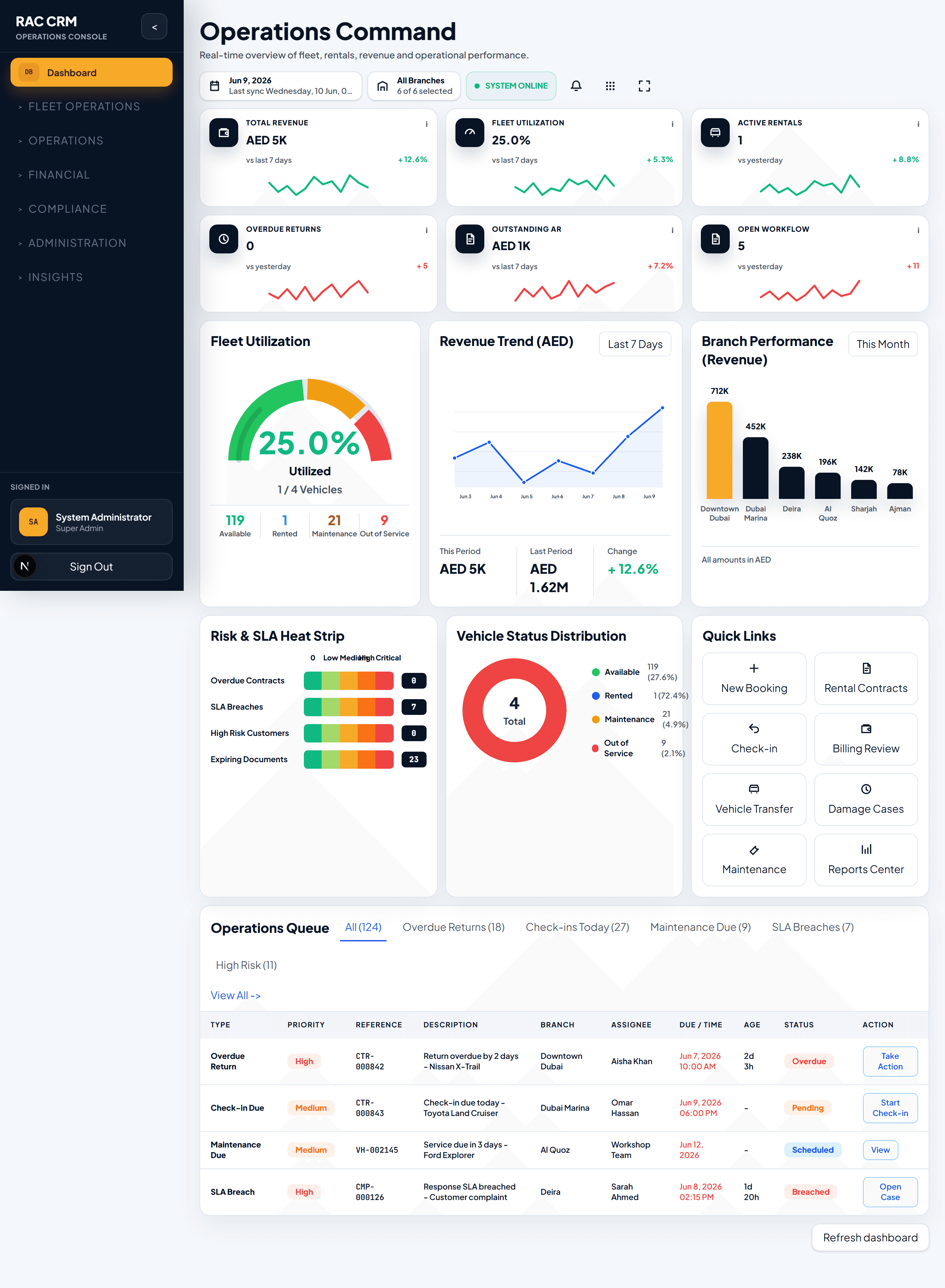
The executive dashboard displays KPIs, fleet status, financial summary, and operational alerts.
Customize your dashboard view by selecting your branch scope from the top navigation. Branch managers see branch-level data; regional managers see aggregated multi-branch data.
Quick Links
Common tasks and where to find them:
| Task | Where to Go |
|---|---|
| Create a new customer | Customers → Add Customer |
| Book a vehicle for a walk-in | Reservations → New Reservation |
| Check out a vehicle to a customer | Contracts → New Checkout |
| Process a vehicle return | Contracts → Check-in |
| Raise a maintenance request | Vehicles → Select Vehicle → Request Maintenance |
| Log a customer complaint | Complaints → New Complaint |
| Generate an invoice | Invoices → Generate Invoice |
| View my pending approvals | Workflow → Approvals |
| Check fleet availability | Vehicles → Filter by Status: Available |
| Run a revenue report | Reports → Finance → Revenue Report |
| Add a new user | Administration → Users → Add User |
| Configure a workflow | Administration → Workflow Config |
Documentation Sections
Use the sidebar to navigate to any module. Each section includes:
- Business context — what the module does and why it matters
- Screen guide — key pages, fields, and their purpose
- Step-by-step workflows — how to perform common tasks end-to-end
- Tables and reference data — field definitions, status values, permission requirements
- Screenshots — visual reference for every interface
Start with Getting Started if you are new to the platform, or System Architecture if you need a technical overview.